Home

System and features

How Alo HR ơi works

A complete HR system for Vietnamese companies: employees handle their own HR tasks, managers approve everything in one place, HR runs the whole employee lifecycle, and an AI assistant reads your own policies to answer and prepare the work.

  • 12modules
  • ~60features
  • 5AI agents
  • 4interface languages

Roles

Everyone sees exactly their part of the work

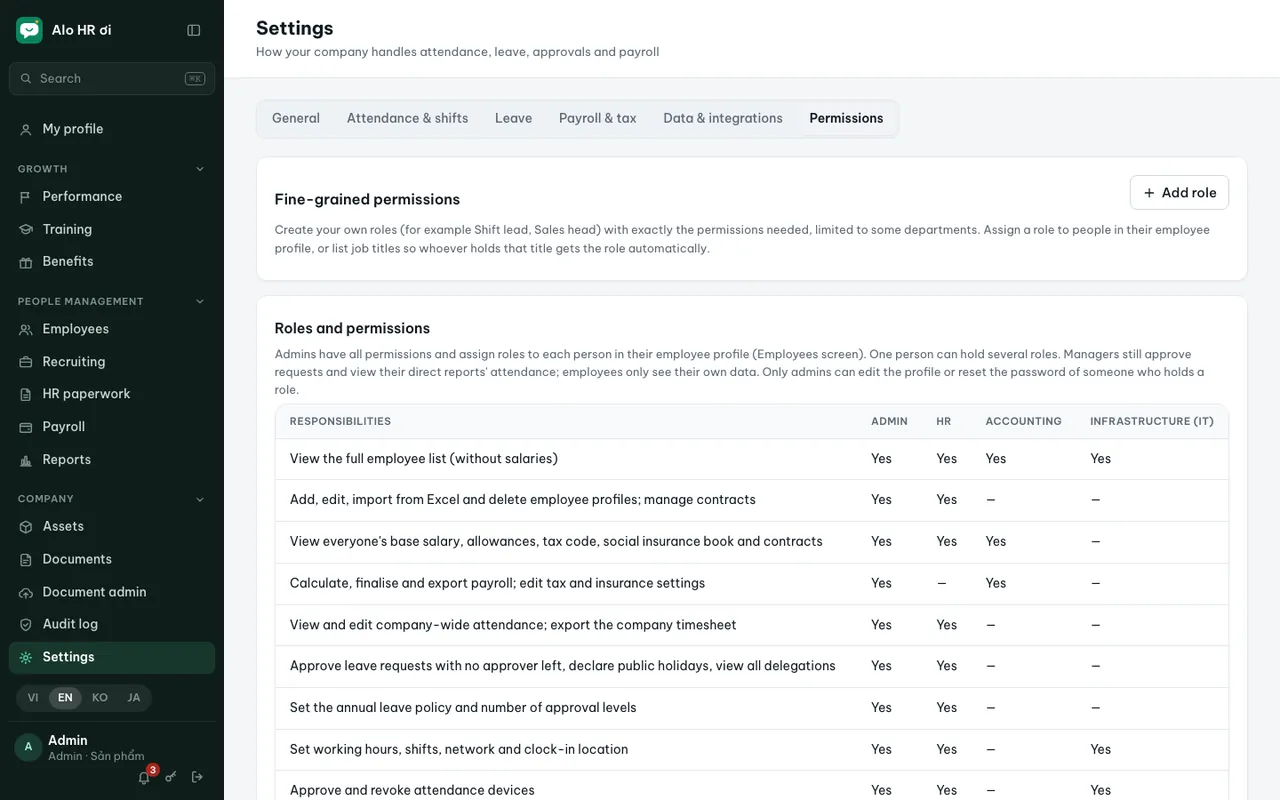
Permissions are checked on the server for every action. Besides the three main roles, companies create their own roles (for example Shift lead, Payroll accountant) limited to certain departments.

Employees

Self-service on phone or computer, without asking HR.

  • Clock in, request leave, overtime and business trips
  • See payslips, leave balance and assets held
  • Sign contracts and decisions electronically
  • Ask the assistant about policy, add private work documents
Managers

See how the team is doing and approve everything from one inbox.

  • Approve leave, overtime, expenses and shift swaps
  • See who is late, left early or absent today
  • Set goals and review direct reports
  • Delegate approvals while away

HR and admins

Run the whole employee lifecycle and configure the system.

  • Records, contracts, decisions, payroll, insurance, tax
  • Hiring, onboarding, offboarding, training, benefits
  • Approval rules, shifts, photo, QR and GPS attendance
  • Permissions, reports, backups, integrations

How it works

From one sentence to a finished request

The AI assistant never changes data on its own. It reads, prepares and waits for someone with the right to confirm.

  1. 1

    Ask in plain words

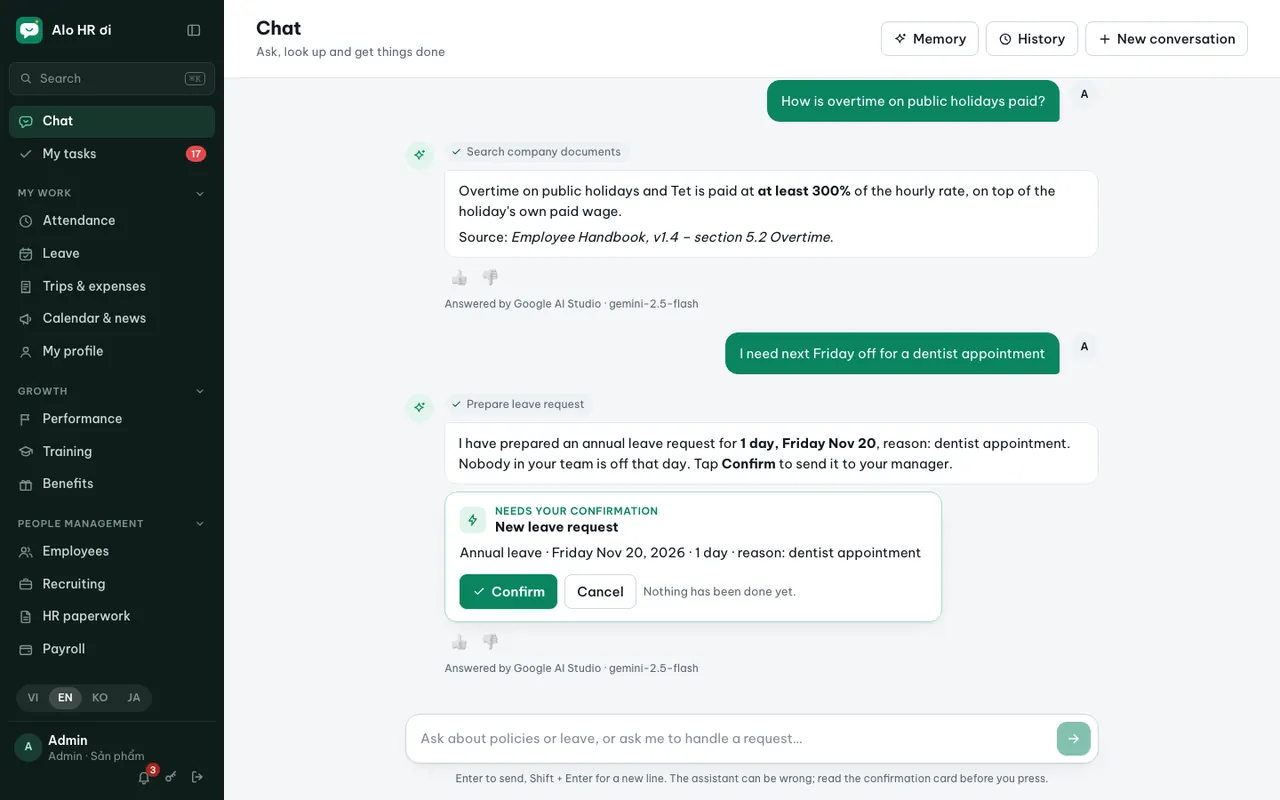
    An employee types or says: "I need next Friday off for a doctor’s appointment."

  2. 2

    Read the right data

    The assistant looks up company policy, leave left and the team’s time off, only within what that person may see.

  3. 3

    Prepare the request

    The system drafts the request with a Confirm card and checks overlaps and balance in code, not by AI judgement.

  4. 4

    Confirm and approve

    The employee taps Confirm; the request goes to the approver set by department rules and escalates when overdue.

  5. 5

    Record and notify

    Every action is logged, notified in the app and by email, and flows into the timesheet and payslip.

See it in action

Two things employees do every day

Ask the assistant like a colleague

Employees ask about their leave balance or overtime rules, or ask for a leave request in one sentence. Policy answers always name the document and version; anything that changes data shows a Confirm card for the person to tap.

  • Looks up your own figures at the moment you ask
  • Answers from company documents, with sources
  • Creates requests from plain words, checks overlaps and balance
  • Nothing happens until you tap Confirm
Real screenshot: Ask the assistant like a colleague

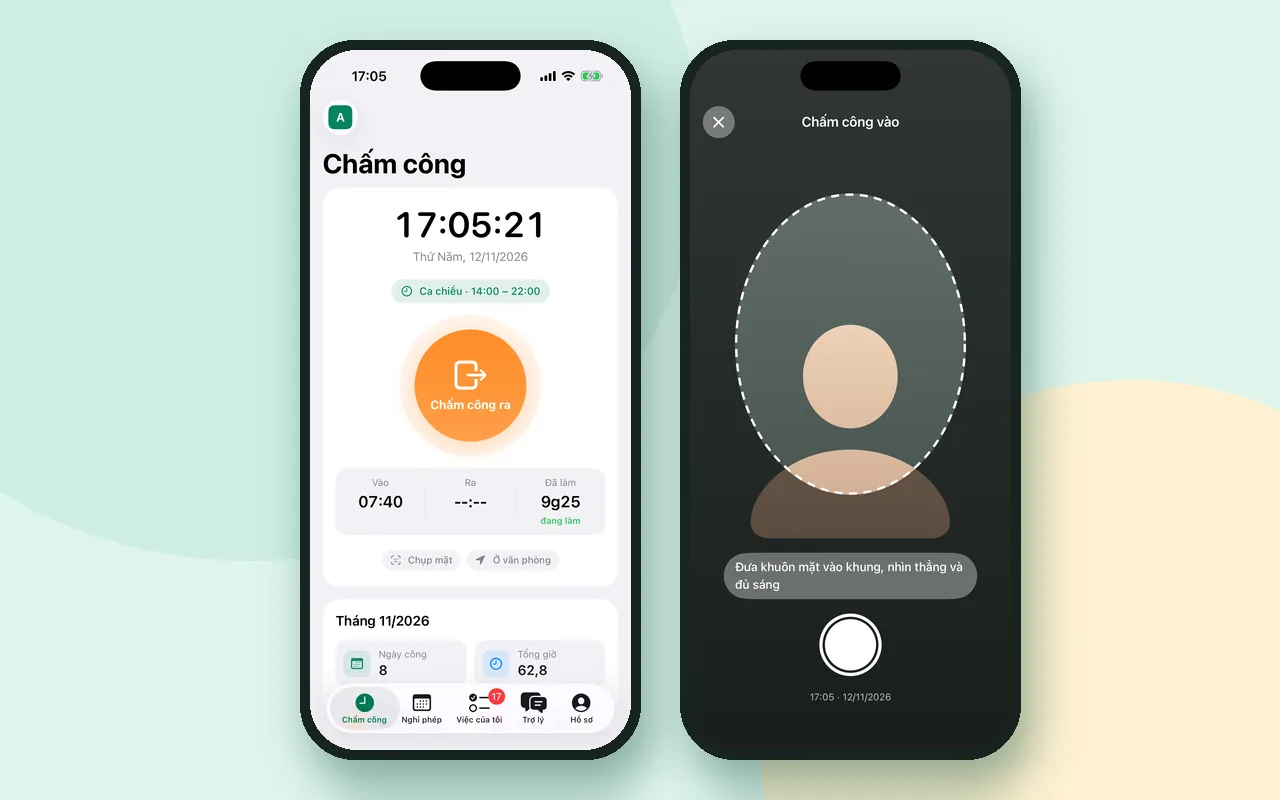
Clock in with face photo and GPS

In the mobile app, employees tap one big button and take a face photo inside a guide frame; the system records the GPS location and only accepts it inside the office radius your company sets.

  • Front-camera face photo, checked for a face
  • GPS position checked against the office radius (plus device accuracy)
  • One device per person, unknown devices need approval
  • Photos auto-delete after the days your company chooses (max 90)
Real screenshot: Clock in with face photo and GPS

Modules

12 modules in one system

Every plan includes all of the modules below. Data lives in one place, so attendance flows straight into payroll and hiring straight into employee records.

01

Attendance, shifts

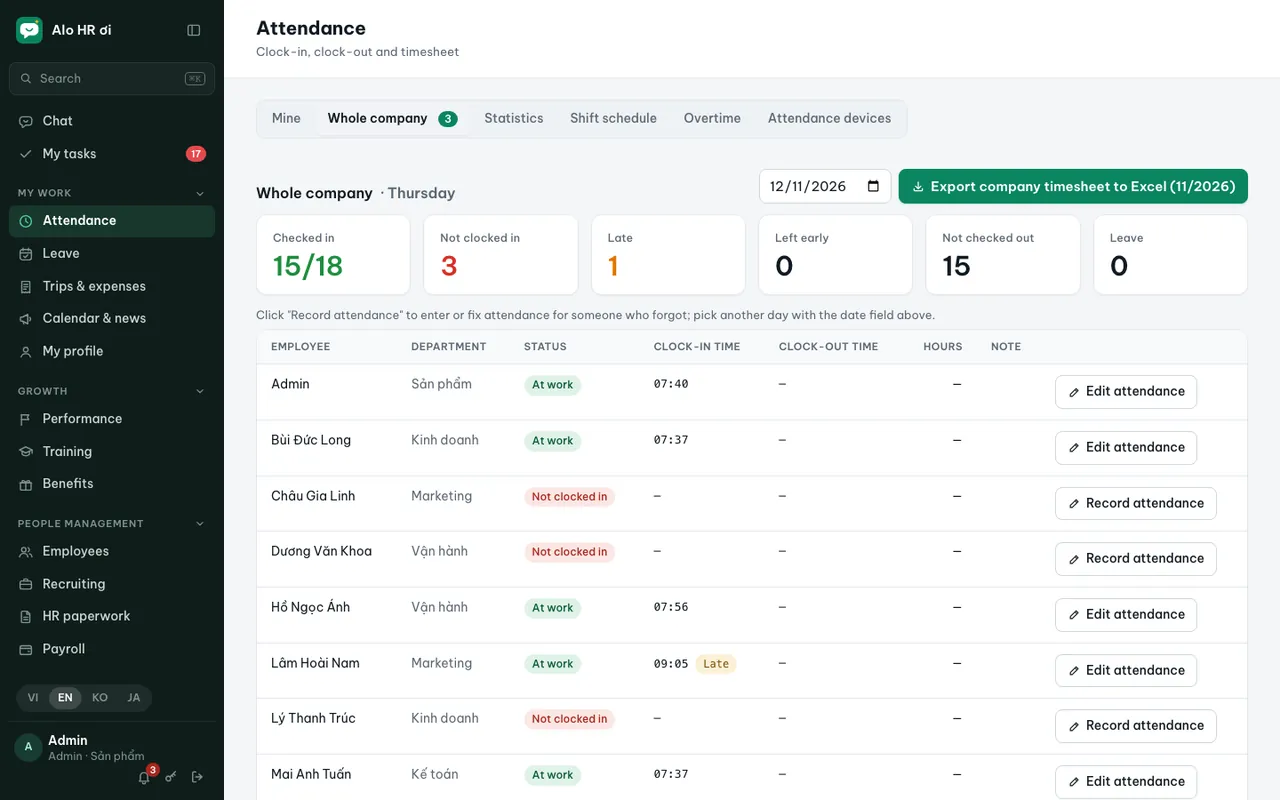
Clock in by phone, face photo, office QR code, or limit by GPS and Wi-Fi. Rotating shift schedules, swaps between colleagues, automatic late, early-leave and overtime calculation.

  • Clock in from a phone or computer
  • Face photo at clock-in
  • Scan the QR code at the office
  • Limit by GPS location or office Wi-Fi
  • One device per person, approve new devices
  • Shift schedules, swaps between colleagues
  • Timesheets, late arrivals and early leaves, Excel export

For: Employees, managers, HR

Real screenshot: Attendance, shifts
02

Leave, overtime

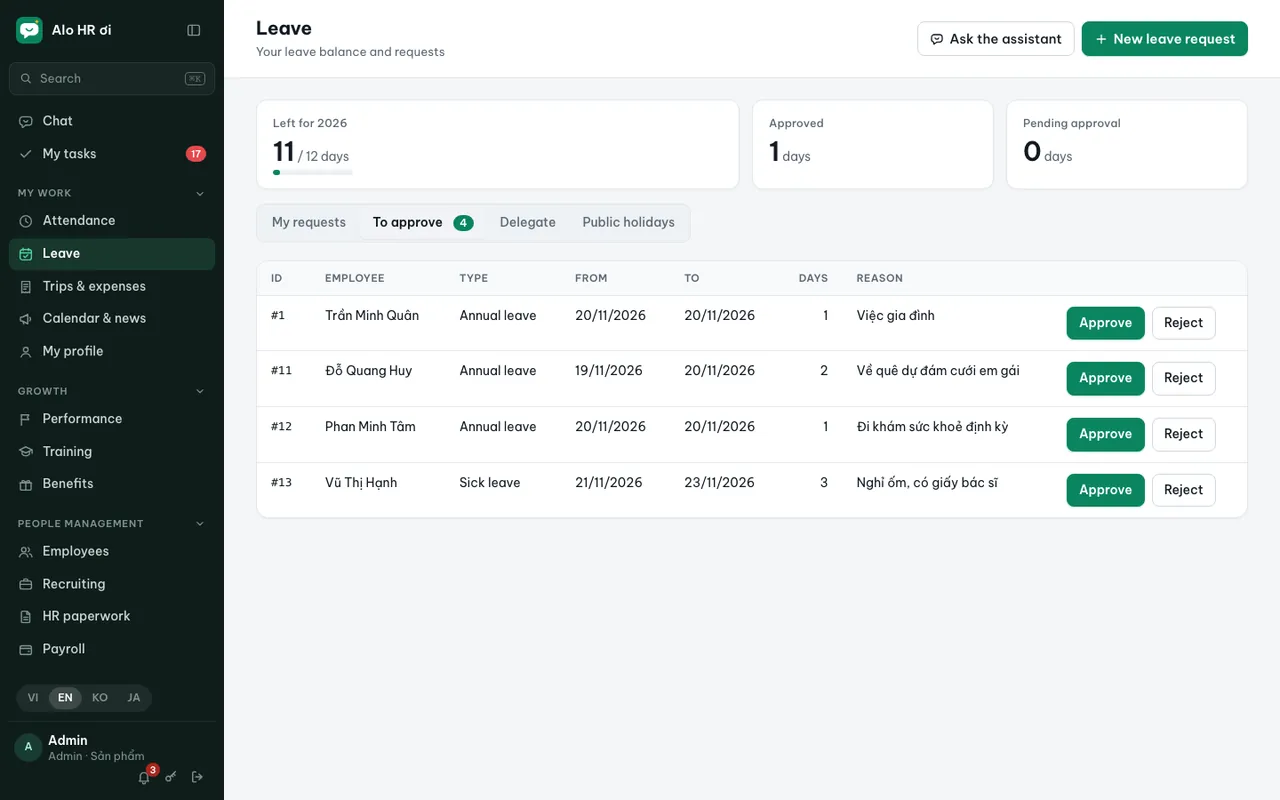
Request leave in one sentence to the assistant or with a form. Balances, carry-over and holidays calculated automatically; one or more approval levels by department, with backup approvers and delegation.

  • Request leave in one sentence to the assistant
  • Annual, sick, maternity and unpaid leave
  • Manager approval, delegation while away
  • Leave balances calculated automatically
  • Log and approve overtime, with hour limits

For: Employees, managers

Real screenshot: Leave, overtime
03

Payroll, insurance, tax

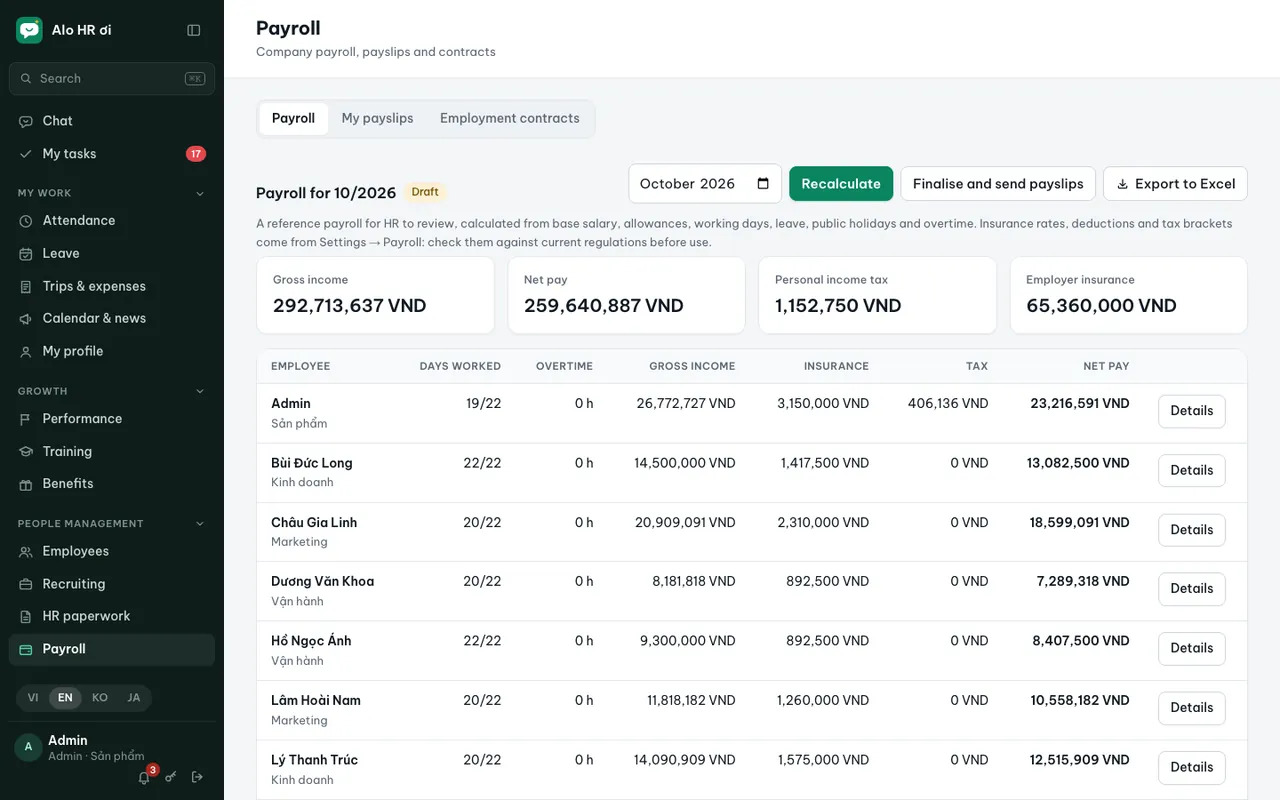
Payroll from timesheets, leave, overtime, bonuses and penalties; insurance and personal income tax deducted with configurable brackets; close payroll and send each person a payslip.

  • Payroll from timesheets
  • Bonuses, allowances, penalties, deductions
  • Social insurance and personal income tax
  • Close payroll, a payslip for every employee
  • Tax, insurance and accounting exports

For: HR, accounting

Real screenshot: Payroll, insurance, tax
04

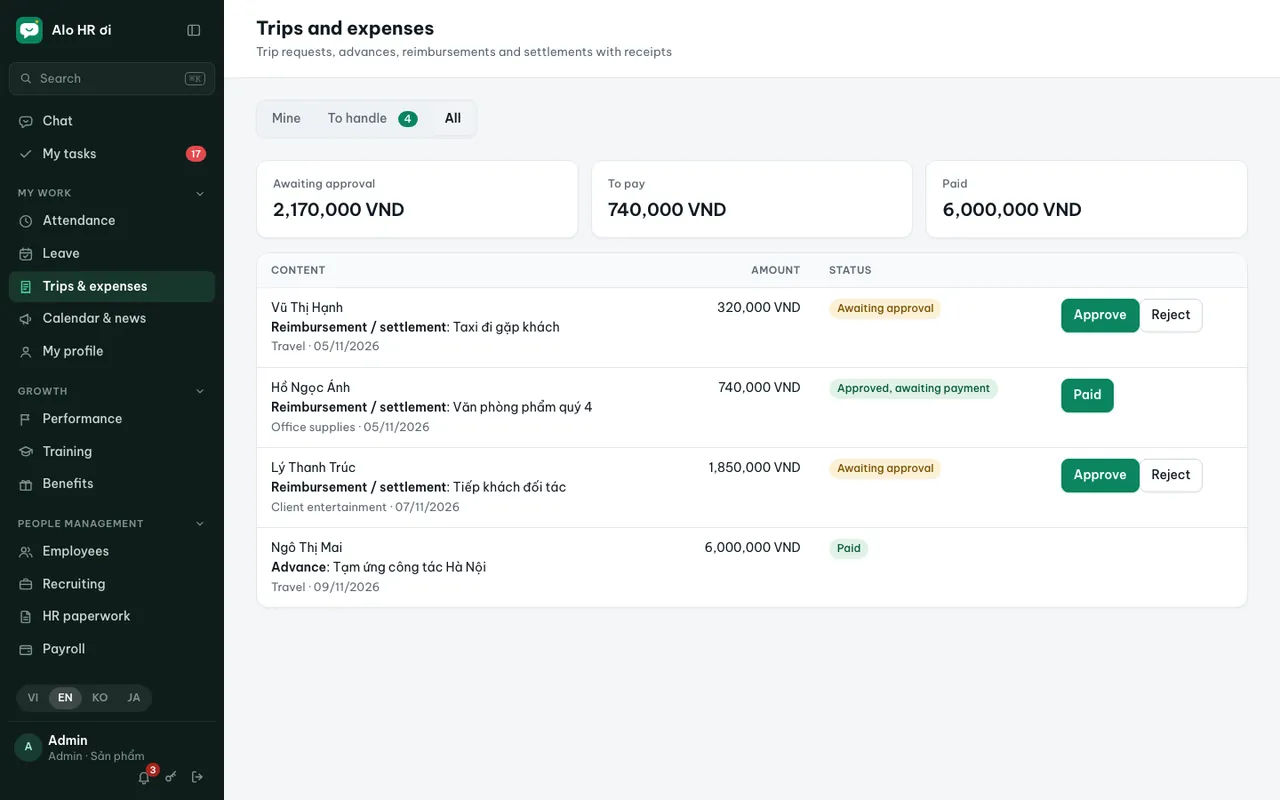
Travel, expenses

Business trip, cash advance and settlement requests with receipt photos. Approval by amount limits, large amounts need extra approvers; accounting records the payment.

  • Business trip requests
  • Cash advances and settlements
  • Expense claims with receipt photos
  • Manager approval, accounting records payment

For: Employees, managers, accounting

Real screenshot: Travel, expenses
05

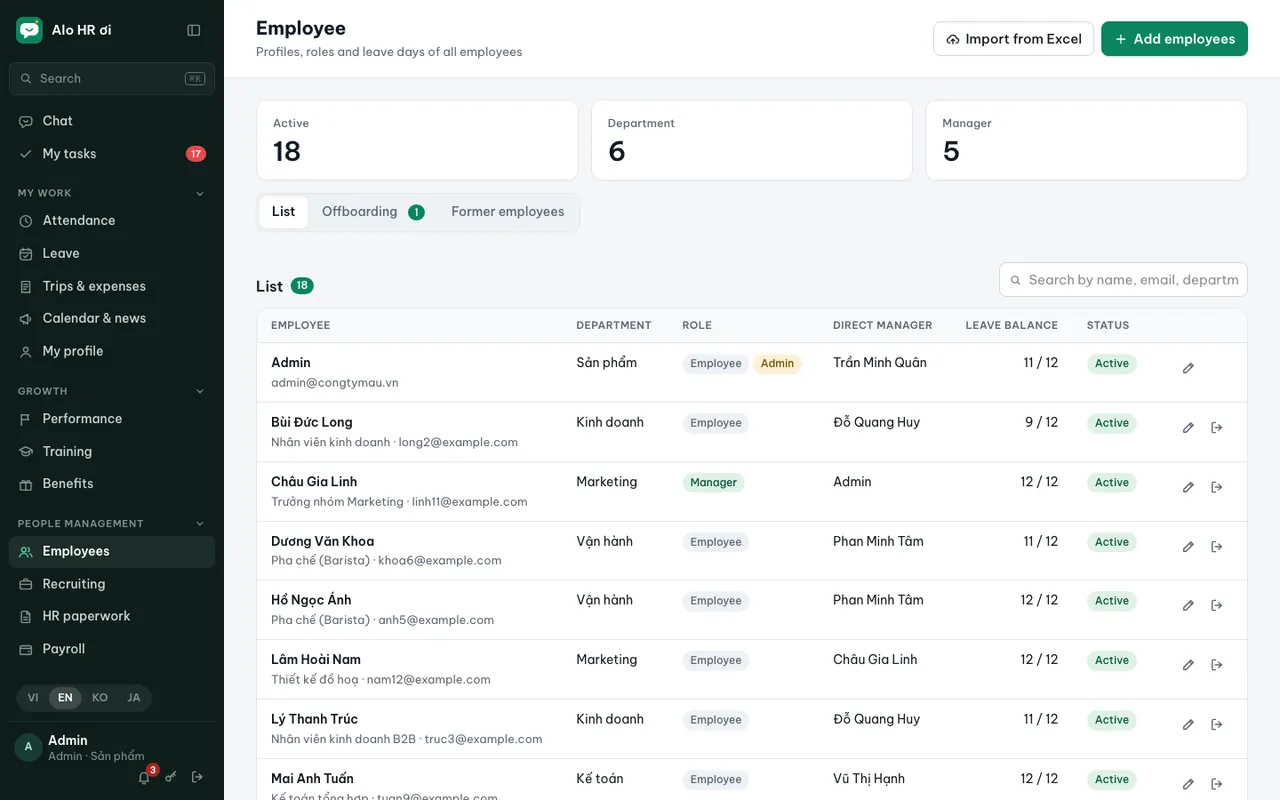
Employee records

Full records from ID card and bank account to dependants. Employees request profile changes, HR approves; probation tracking, employment and income certificates.

  • Full records: ID card, bank account, dependants
  • Departments, titles, direct manager
  • Employees request profile changes themselves
  • Probation tracking
  • Employment and income certificates

For: HR, employees

Real screenshot: Employee records
06

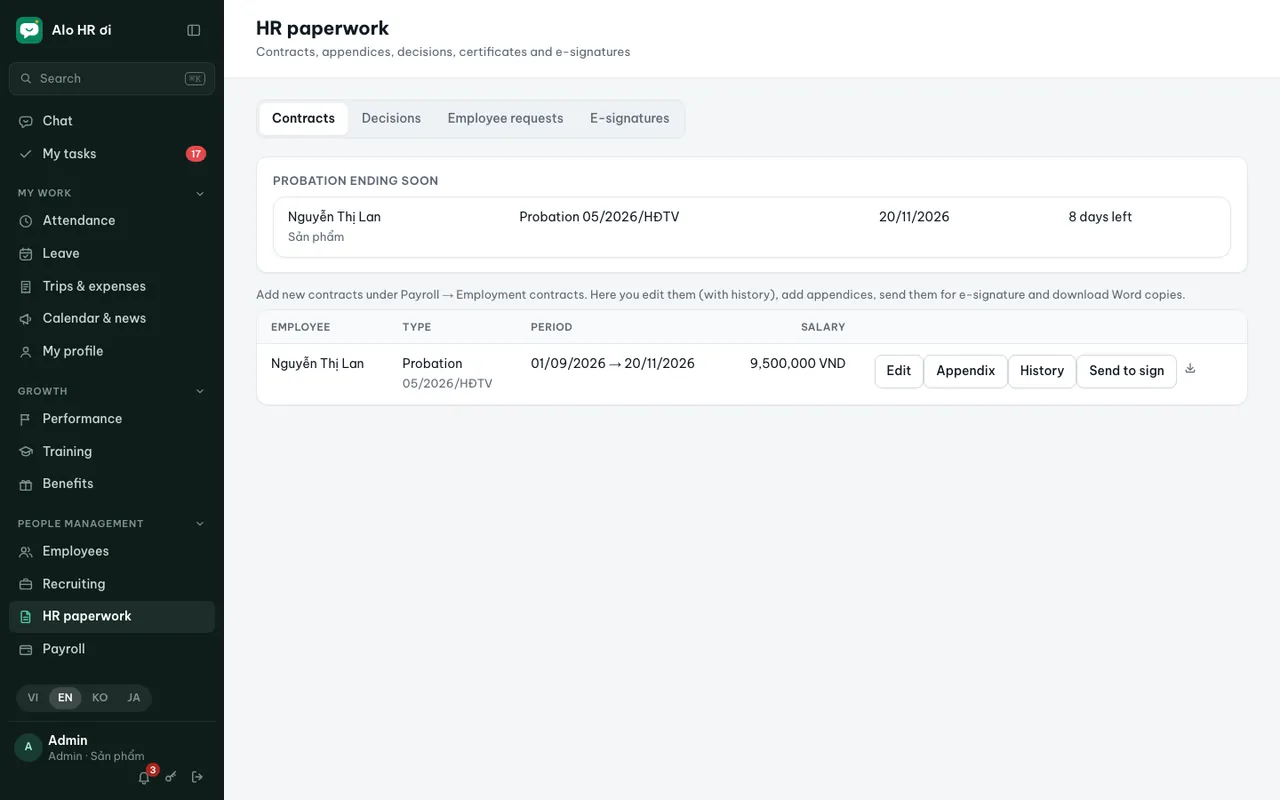
Contracts, decisions, e-sign

Contracts and annexes with change history and expiry reminders. 7 properly formatted decision templates, Word export, e-signature with OTP and a drawn signature.

  • Probation, fixed-term, indefinite, seasonal contracts and annexes
  • Contract history, reminders before expiry
  • 7 decision templates: hiring, appointment, transfer, raise, reward, discipline, termination
  • Properly formatted Word documents
  • E-signature with OTP and a drawn signature

For: HR, employees

Real screenshot: Contracts, decisions, e-sign
07

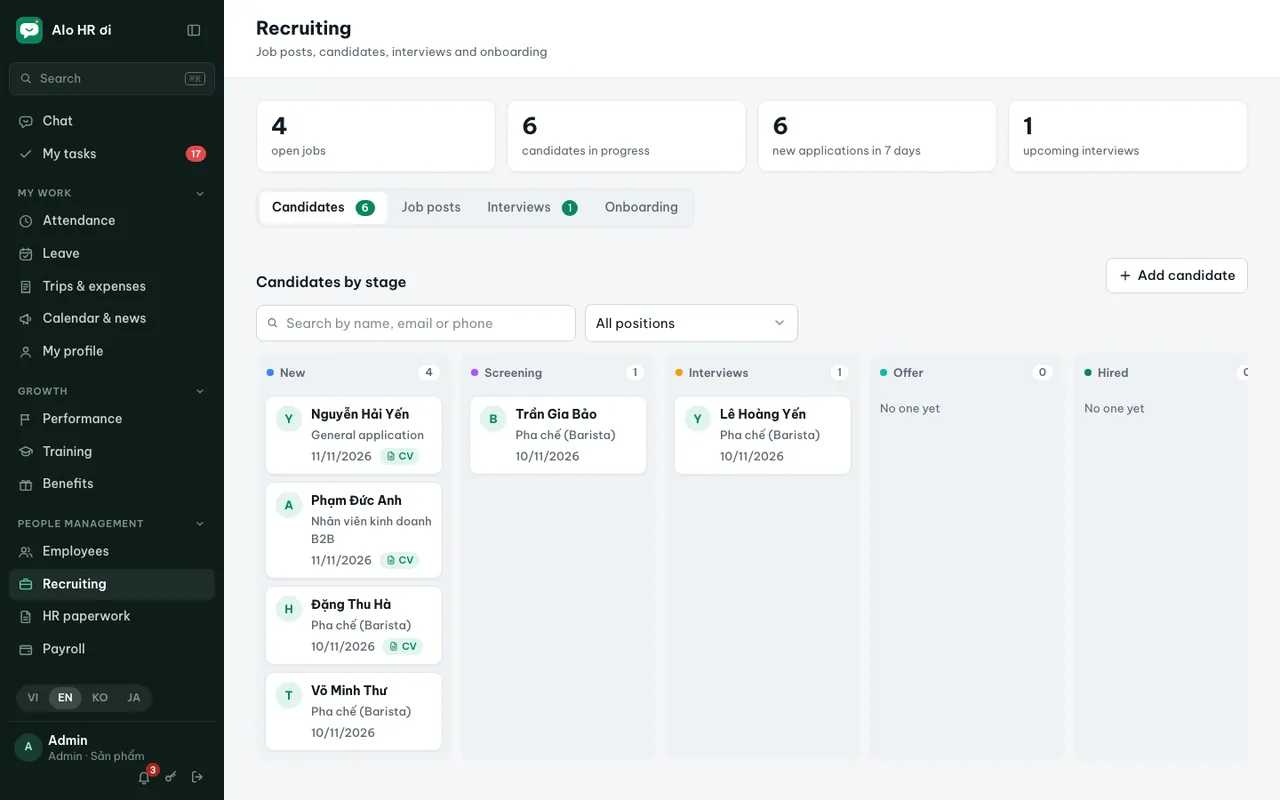
Hiring, onboarding

Job posts and a public careers page; candidates apply without an account. Track by stage, schedule interviews, invitations with a confirm button, and a hire creates the record and onboarding checklist.

  • Job posts and a public careers page
  • Candidates by stage, CVs stored
  • Interview schedules and interviewer feedback
  • Hiring and a new-starter onboarding checklist

For: HR, interviewers

Real screenshot: Hiring, onboarding
08

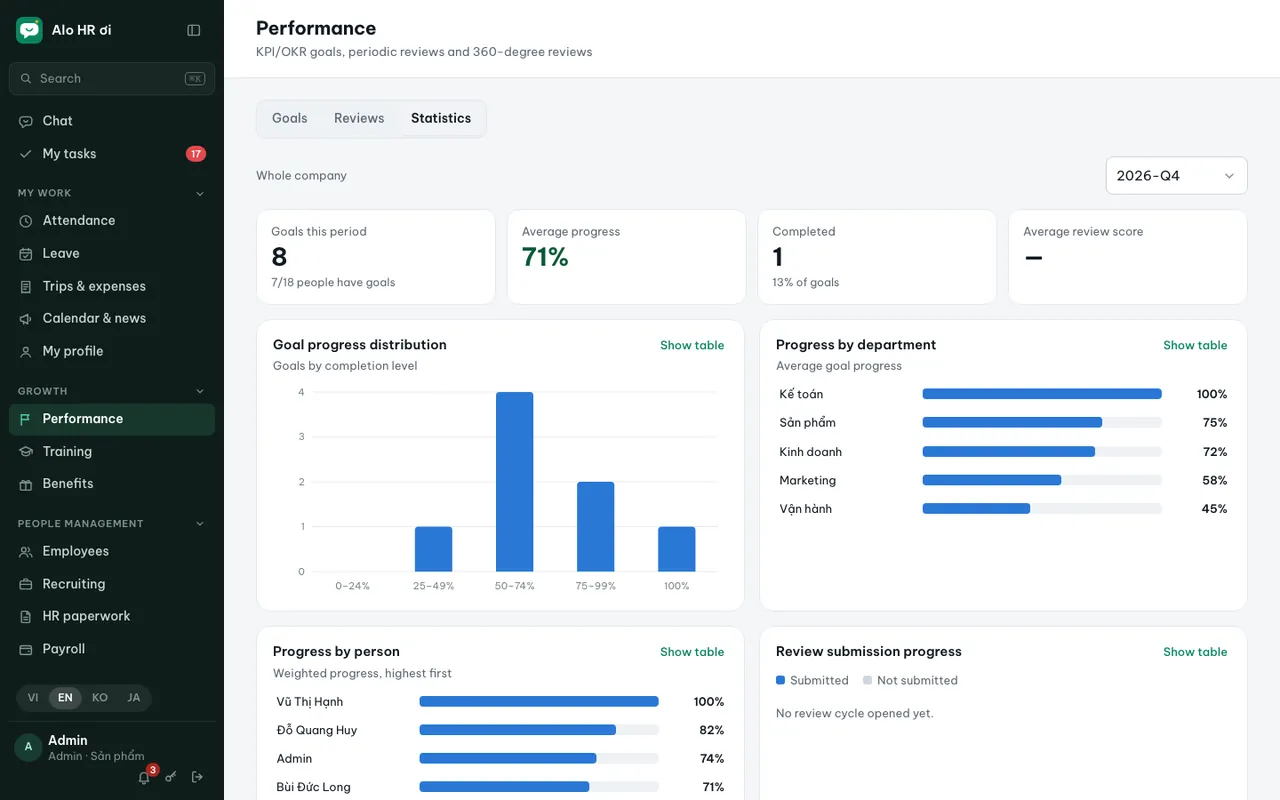
Goals, reviews, training

KPI and OKR goals with key results; review cycles with self, manager and 360° peer reviews. Internal courses, quizzes, certificates and training budget.

  • Goals as KPIs or OKRs
  • Review cycles: self, manager and peers
  • Courses, learning paths, assignments and completion tracking

For: Managers, employees, HR

Real screenshot: Goals, reviews, training
09

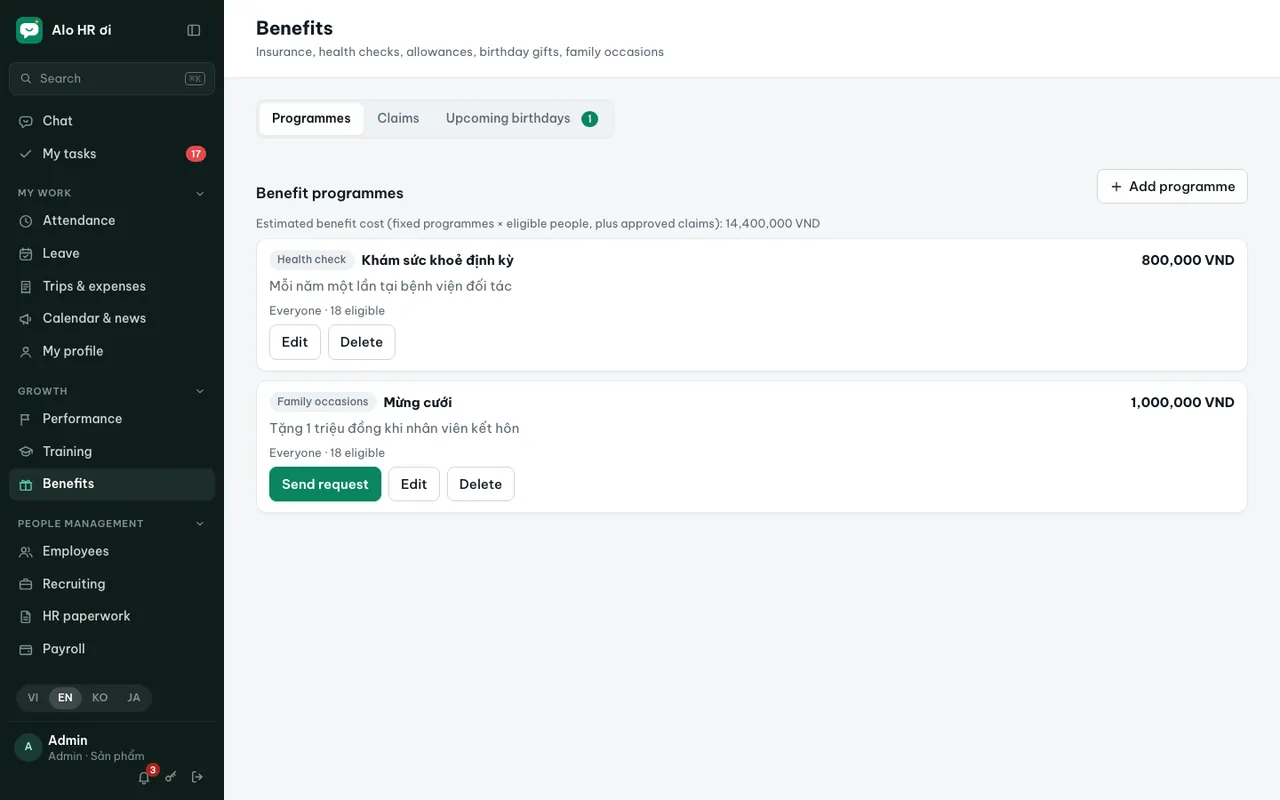
Benefits, assets

Benefit programmes by tenure and department; employees claim family-occasion benefits themselves. Hand over and collect assets with photos and invoices, confirmed by both receiver and HR.

  • Benefits: insurance, health checks, birthdays, family events
  • Employees claim benefits themselves
  • Hand over and collect assets with photos and invoices
  • Two-way confirmation by receiver and HR

For: Employees, HR, IT

Real screenshot: Benefits, assets
10

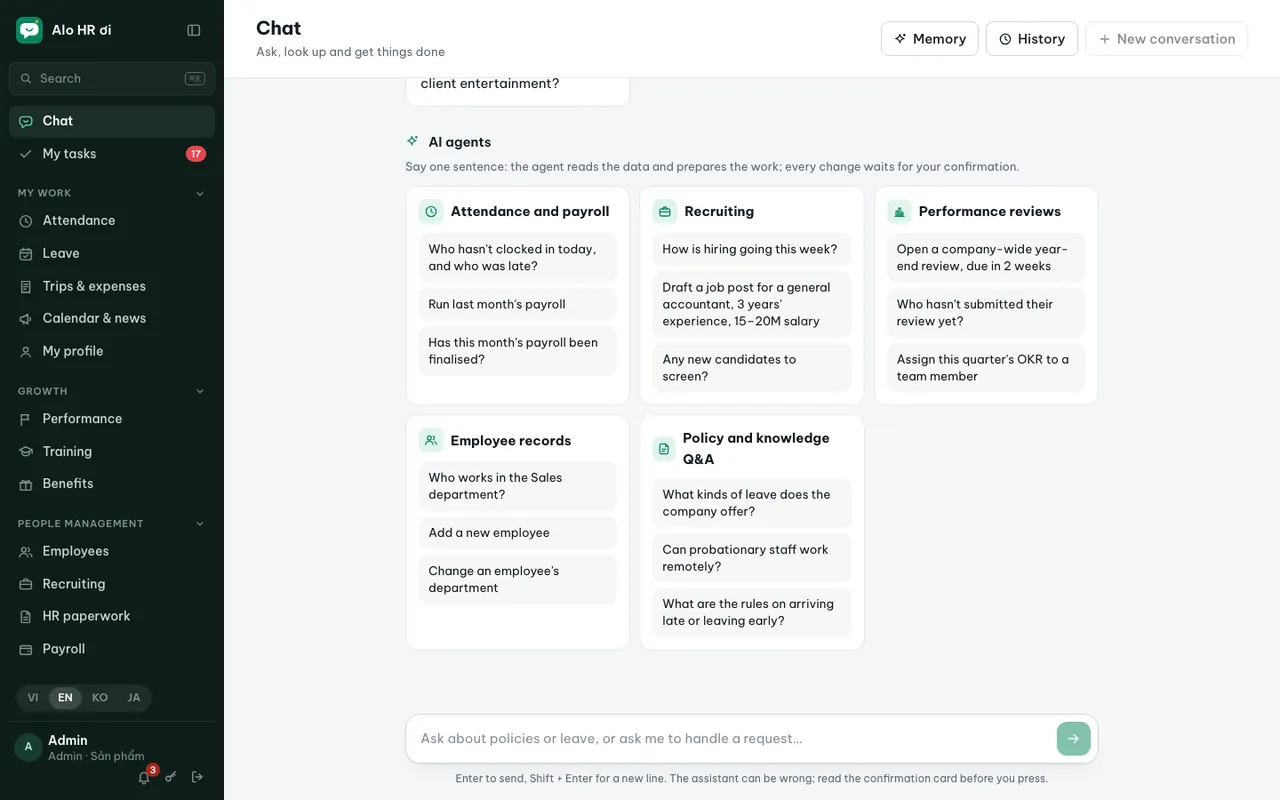
AI assistant, documents

The assistant answers from company documents with sources, looks up personal data and creates requests from plain words. 5 AI agents handle attendance and payroll, hiring, reviews, records and policy Q&A.

  • Answers from your rules and policies, with sources
  • Look up your own leave, timesheet and assets
  • Create requests in plain language
  • Private documents only their owner can use
  • AI-written HR reports and documents

For: Everyone

Real screenshot: AI assistant, documents
11

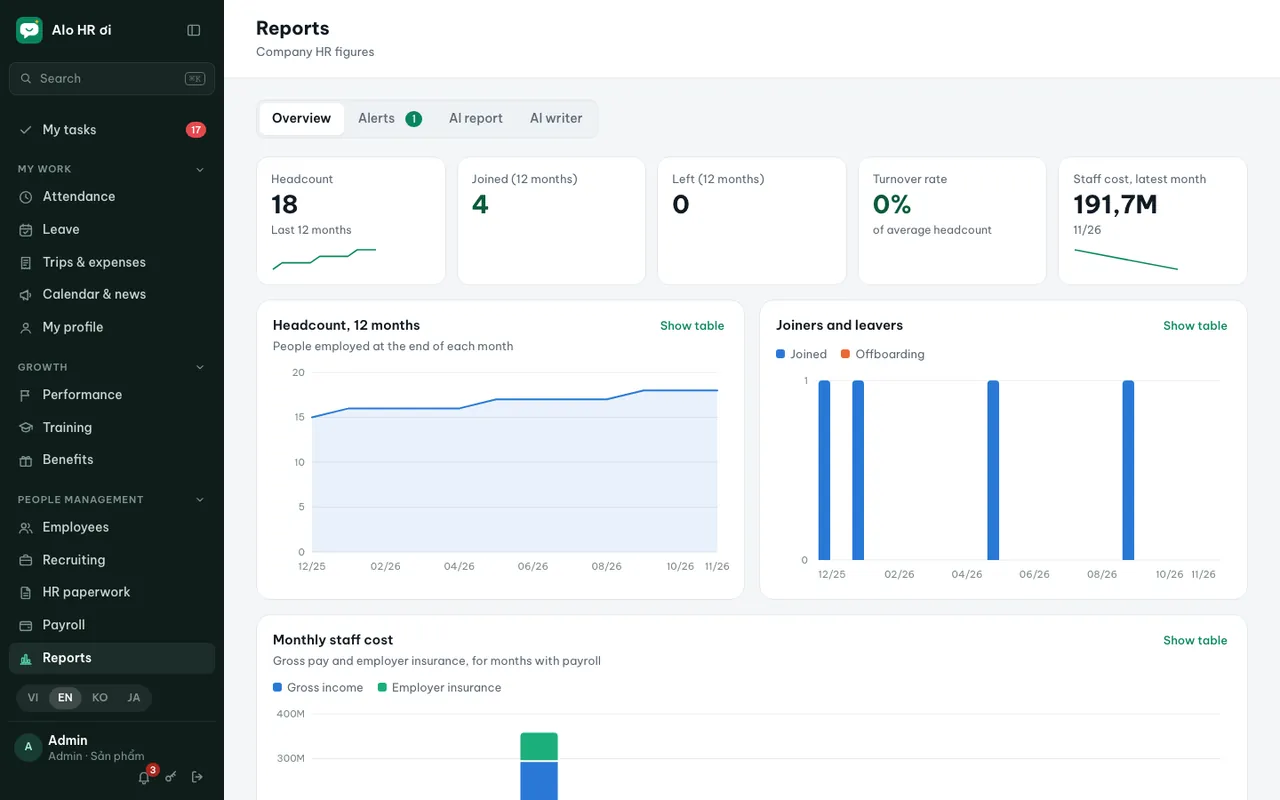
Operations, reports

My tasks gathers everything to approve, overdue or due soon. Search everything, HR reports on headcount, cost and attendance with charts, and anomaly alerts.

  • My tasks: to approve, overdue, due soon
  • Search everything (Ctrl K)
  • HR reports and anomaly alerts
  • Company calendar, announcements, automatic reminders
  • In-app and email notifications

For: Managers, HR, leadership

Real screenshot: Operations, reports
12

Security, integrations

Two-factor sign-in, fine-grained permissions, a log of every action, backup and restore. Connect Slack, Teams and Google Chat by webhook, and accounting software by API.

  • Two-factor sign-in for every account
  • Role-based access, custom roles per department
  • Log of every action
  • Backup and restore
  • Slack, Teams, Google Chat and API
  • Vietnamese, English, Korean and Japanese interface

For: Admins, IT

Real screenshot: Security, integrations

Screenshots from the real app with sample data (names and figures are fictional). Click an image to see it full size.

Platforms

Use it anywhere

Web app

Runs in the browser on computers and phones, nothing to install. Each company gets its own sign-in address with its logo and colours.

iPhone and Android apps

Native apps for employees and managers: one-tap clock in, leave, my tasks, profile and the assistant.

AI assistant

Answers in Vietnamese or in the language the person writes in; every policy answer names the document and version.

Integrations

Webhooks to Slack, Teams and Google Chat; read-only API keys for accounting software; Excel exports with the columns you choose.

Security

HR data protected at every layer

Two-factor sign-in for every account

Besides the password, each sign-in needs a 6-digit code from your phone. Lost it? Use a backup code.

Private documents only you can see

Personal notes and files you give the assistant are yours alone; not even admins can open them.

Nothing changes until someone confirms

The assistant only prepares. Leave balances, overlaps and approval rights are checked in code, not decided by AI.

A separate database per company

Your company data is fully separated from other companies. No shared tables.

Try it on your own company’s data

Create a workspace in a few minutes, no card needed.